Pi-hole and Unbound on Raspberry Pi 4: Private DNS and Network-Wide Ad Blocking
Problem Statement
Every device on a home network performs DNS lookups before connecting to a website. DNS (Domain Name System) is the mechanism that translates a domain name into an IP address – and the operator of the DNS resolver can observe every domain queried.
In a typical home network, those queries are handled by an ISP or a public DNS provider such as Google or Cloudflare:
1Device → ISP DNS / Public DNS → Internet
This means:
- Your ISP or DNS provider sees every domain queried
- All devices contribute to one central browsing history
- Ads and trackers resolve normally
DNS becomes a record of your activity.
Goals / Non-Goals
Goals
- Block advertising and tracking domains across all devices on the network
- Resolve DNS privately without relying on a third-party provider
- Require no configuration on individual devices
Non-Goals
Installation is not covered. Refer to the official documentation:
Solution
Two services running on a Raspberry Pi 4 address the problem:
| Service | Role |
|---|---|
| Pi-hole | Blocks ads and trackers across all devices at the DNS level |
| Unbound | Locally resolves allowed domains using a recursive DNS resolver, eliminating reliance on external DNS resolvers |
What Is Pi-hole?
Pi-hole acts as a DNS filtering layer.
It maintains a database of known ad, tracker, and malicious domains called gravity. When any device on the network queries a blocked domain, Pi-hole returns 0.0.0.0 – the request is stopped and the ad server is never contacted.
It works at the DNS level, before any content is loaded. No browser extension. No per-device setup. Every device on the network is covered automatically.
Without Pi-hole:
1Device → Public DNS → Ad domain → Content loads
With Pi-hole:
1Device → Pi-hole → Blocklist match → 0.0.0.0 / NXDOMAIN returned → Connection fails
What Is Unbound?
Unbound is a validating, caching recursive DNS resolver.
It performs the same role as public DNS resolvers but can be hosted locally within a home or private network.
Instead of forwarding queries to an external resolver, Unbound resolves domain names directly by querying the DNS hierarchy (root, Top-Level Domain, and authoritative servers).
Public DNS vs Recursive Resolver
These terms are often confused.
| Term | Meaning |
|---|---|
| Recursive resolver | A DNS function or role |
| Public DNS | A resolver operated by a third party |
Google DNS, Cloudflare DNS, and Unbound all perform recursive resolution. The difference is who operates the resolver.
DNS Resolution with Unbound
The DNS system is organised as a hierarchy. Every domain name maps to a position within this tree:
1                    . (root)
2                    │
3       ┌────────────┼────────────┐
4      .org          .com         .uk      ← TLD (Top-Level Domain)
5       │             │            │
6 wikipedia.org   google.com    bbc.co.uk  ← second-level domain
7       │
8 en.wikipedia.org                         ← subdomain
When a device requests en.wikipedia.org, Unbound performs recursive resolution, locating the answer step by step:
- Queries the
root serversto learn which servers manage.org - Queries the
.org TLD serversto find theauthoritative serversforwikipedia.org - Queries the authoritative servers for
wikipedia.org— which store the domain’s official DNS records — to obtain the IP address foren.wikipedia.org - Returns the result to Pi-hole, which then replies to the requesting device
Public DNS providers such as Google or Cloudflare perform the same recursive process on external infrastructure. Because DNS queries are sent to their resolvers first, those providers can observe — and potentially log — the domains being requested.
When Unbound runs locally, it performs this resolution itself by querying the DNS hierarchy directly instead of forwarding requests to a public resolver. As a result, no single third-party provider receives a complete history of DNS activity. Unbound also caches responses locally, allowing repeated queries to be answered faster and improving overall lookup performance.
Architecture
The diagram below compares DNS query flows side by side – with Pi-hole and Unbound on the left, and without on the right – showing exactly where queries are intercepted, filtered, or exposed at each step.

With Pi-hole + Unbound
1Devices → Pi-hole (filter + cache) → Unbound (recursive resolver) → Root → TLD → Authoritative servers
Without Pi-hole + Unbound
1Devices → ISP DNS / Public DNS → Internet
How It Works
Homelab Setup
I set up Pi-hole and Unbound on a Raspberry Pi 4, connected to my home broadband router. Pi-hole is assigned a static IP address (192.168.1.143) and acts as the DNS server for the entire network.
Hardware
- Raspberry Pi 4 Model B – 4 GB RAM
- Raspberry Pi OS Lite 64-bit (headless)
- Static IP address:
192.168.1.143
Services
| Component | Address | Purpose |
|---|---|---|
| Pi-hole | 192.168.1.143:53 | Network DNS server |
| Unbound | 127.0.0.1:5335 | Local recursive resolver |
Router Configuration
On my broadband router, I disabled DHCP and set the DNS Primary Server to Pi-hole's static IP:
| Setting | Value |
|---|---|
| DHCP | Disabled |
| DNS Primary Server | 192.168.1.143 |
With DHCP disabled on the router, Pi-hole takes over as the DHCP server. All devices on the network automatically receive 192.168.1.143 as their DNS server – no manual configuration required on client devices.
I also pointed the router's own DNS to Pi-hole, so router-originated queries are resolved locally.
Unbound Binding
Unbound listens only on localhost:
1127.0.0.1:5335
This means:
- It is not exposed to the network
- Only Pi-hole can query it
- External access is prevented
Upstream DNS Configuration
All third-party upstream DNS providers are disabled in Pi-hole.
Only Unbound is configured:
1127.0.0.1#5335
This ensures DNS queries are resolved locally.
Pi-hole Configuration
Blocklist Management
Pi-hole includes a default blocklist on installation:
1https://raw.githubusercontent.com/StevenBlack/hosts/master/hosts
This provides a baseline set of advertising and tracking domains.
I added two additional lists under Pi-hole → Group Management → Lists. HaGeZi's DNS blocklists are modern, consolidated lists designed to replace multiple smaller ones — covering ads, trackers, telemetry, malware, scam domains, and threat intelligence feeds in a single maintained source.
| List | URL |
|---|---|
| HaGeZi Pro | https://cdn.jsdelivr.net/gh/hagezi/dns-blocklists@latest/adblock/pro.txt |
| HaGeZi Threat Intelligence Feeds (medium) | https://gitlab.com/hagezi/mirror/-/raw/main/dns-blocklists/adblock/tif.medium.txt |

After adding, rebuild the gravity database:
1pihole -g
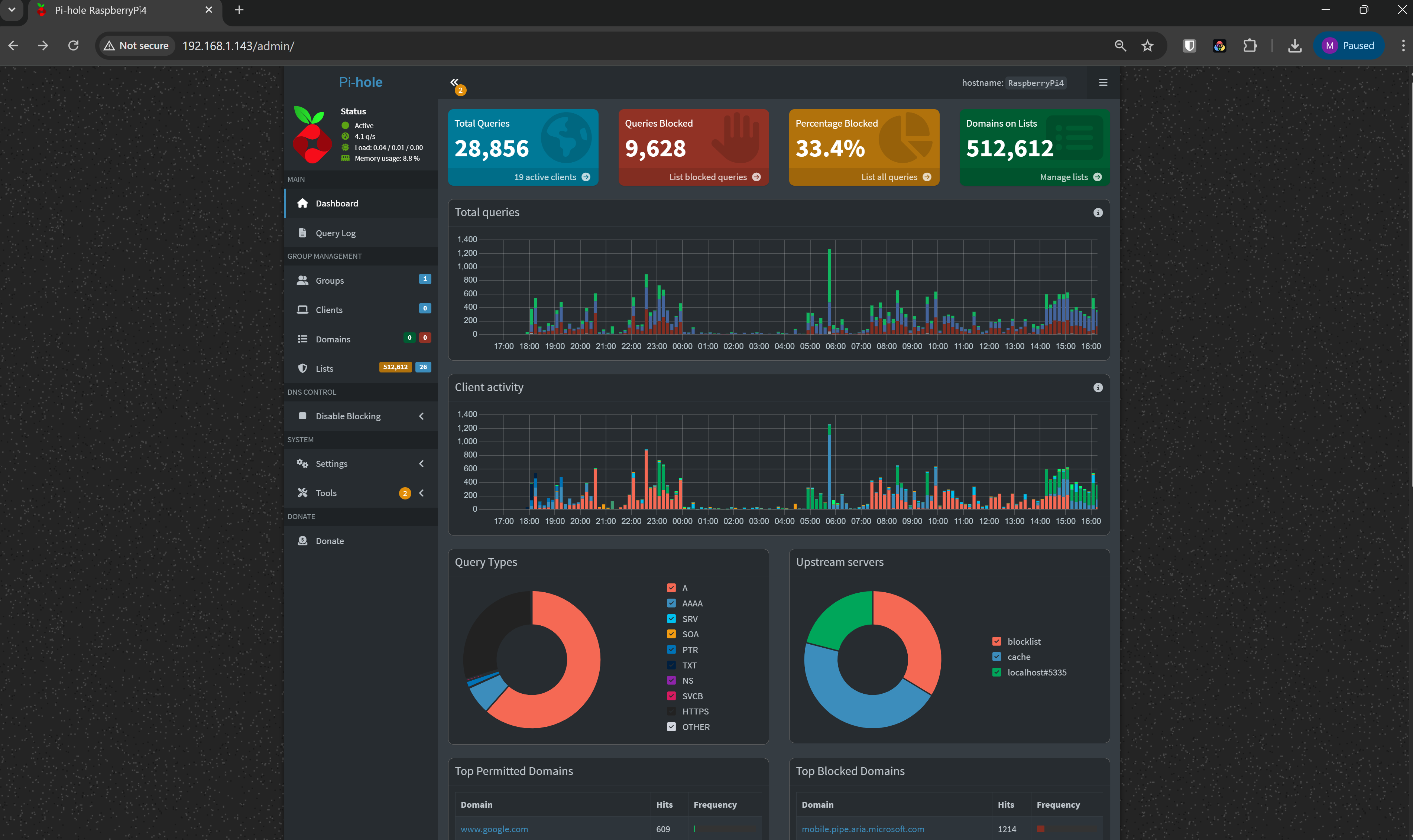
Pi-hole Dashboard
I access the dashboard at:
1http://192.168.1.143/admin
The dashboard provides:
- Real-time DNS query logs
- Top queried and blocked domains
- Blocking statistics
- Device activity overview
Pi-hole + Unbound: Why Together?
Pi-hole blocks unwanted domains but does not resolve allowed domains itself.
Pi-hole only:
1Device → Pi-hole → Public DNS → Internet
Advertising domains may be blocked, but DNS queries remain externally visible.
With Unbound:
1Device → Pi-hole → Unbound → Root → TLD → Authoritative → Response
DNS resolution occurs locally without reliance on public resolvers.
DNSSEC – Validation
DNSSEC adds cryptographic signatures to DNS responses.
Unbound validates these signatures to confirm that responses originate from the legitimate domain authority.
If validation fails, the response is rejected.
DNSSEC protects against tampered or forged DNS responses.
Verifying DNSSEC Validation
I tested DNSSEC validation directly against Unbound by running:
1dig fail01.dnssec.works @127.0.0.1 -p 5335
2dig +ad dnssec.works @127.0.0.1 -p 5335
Invalid DNSSEC domain
fail01.dnssec.works → SERVFAIL
Unbound correctly rejects the response because DNSSEC validation fails.
Valid DNSSEC domain
dnssec.works → NOERROR with ad flag
NOERRORindicates a successful lookup- The
adflag (Authentic Data) confirms the response was cryptographically validated using DNSSEC
Summary:
fail01.dnssec.works→ rejected invalid DNSSEC datadnssec.works→ validated and authenticated successfully
Privacy vs Encryption
These concepts address different concerns.
| Concept | Description |
|---|---|
| Privacy | Who receives DNS queries |
| Encryption | Whether queries are hidden during transmission |
Unbound improves privacy by removing centralised DNS providers.
DNS queries themselves remain standard DNS traffic.
Even though Unbound does not rely on the ISP's DNS resolver, DNS queries still traverse the ISP's network connection. This means the ISP may observe outbound DNS traffic at the network level (in-transit), even though no single external resolver receives a complete history of DNS queries.
Confirming the Setup
From a Windows device on my network, I ran:
1nslookup en.wikipedia.org
This is what I got:
1Server:  pi.hole
2Address:  192.168.1.143
3
4Non-authoritative answer:
5Name:    dyna.wikimedia.org
6Addresses: 185.15.59.224
7Aliases: en.wikipedia.org
Interpretation:
Server: pi.holeindicates Pi-hole handled the query- The request was not sent directly to an ISP or public DNS provider
- Pi-hole forwarded the request internally to Unbound
Verifying Pi-hole Uses Unbound as Upstream
I ran the following tests to confirm that Pi-hole forwards queries to Unbound and that caching is working correctly.
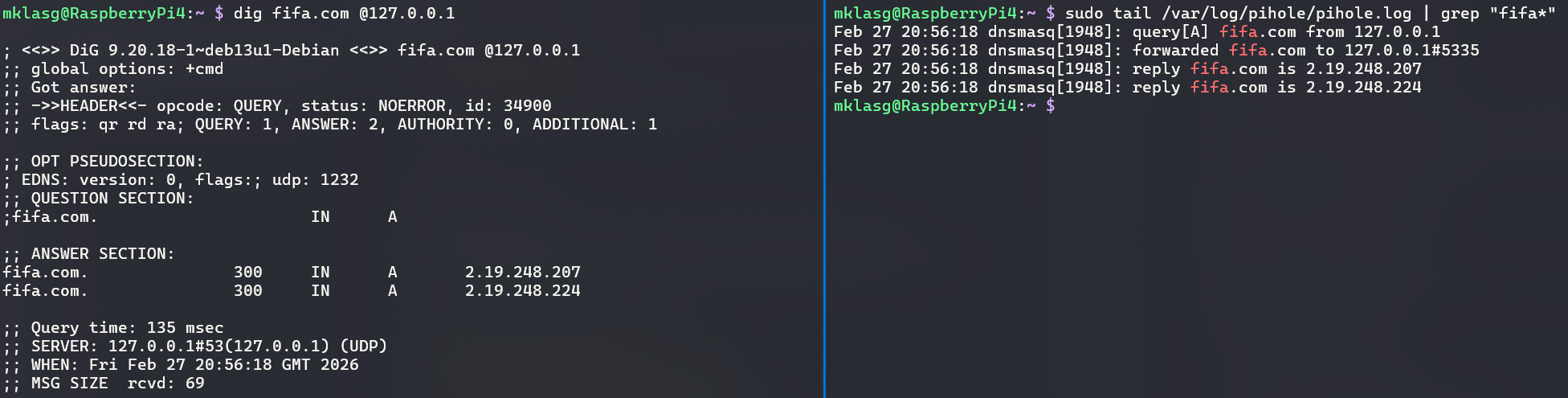
First Query – Recursive Resolution
I ran:
1dig fifa.com @127.0.0.1
2sudo tail /var/log/pihole/pihole.log | grep "fifa"
127.0.0.1 is the loopback address (localhost) — the Raspberry Pi itself. The @127.0.0.1 flag tells dig to send the query to Pi-hole running locally on the device. Pi-hole listens on the standard DNS port 53. It then forwards the query to Unbound, which listens on port 5335.
What I observed:
- Query time ≈ 135 ms
- Pi-hole log showed:
1forwarded fifa.com to 127.0.0.1#5335
2reply fifa.com is 2.19.248.207
3reply fifa.com is 2.19.248.224
Explanation:
- Pi-hole forwarded the query to Unbound at
127.0.0.1#5335 - Unbound performed recursive resolution by querying root, TLD, and authoritative DNS servers
- The higher query time occurs because the result was not yet cached
If you see queries forwarded to
127.0.0.1#5335, Pi-hole is correctly using Unbound as its upstream resolver.
Second Query – Cached Lookup
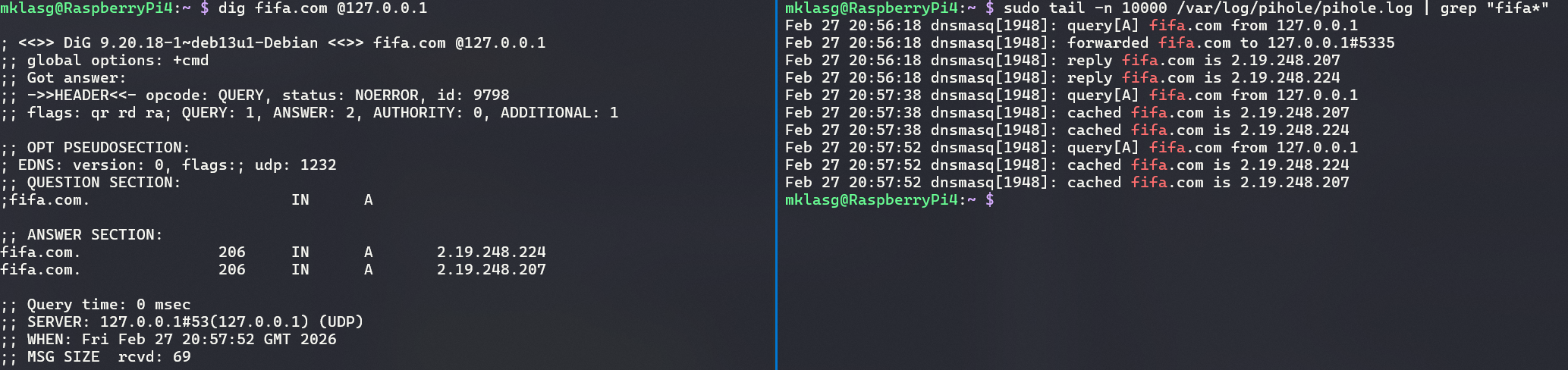
I ran the same query again:
1dig fifa.com @127.0.0.1
2sudo tail -n 10000 /var/log/pihole/pihole.log | grep "fifa"
This time:
- Query time ≈ 0 ms
- The log showed cached responses:
1cached fifa.com is 2.19.248.207
2cached fifa.com is 2.19.248.224
Explanation:
- The result is now served from Unbound's cache
- No external DNS queries are required
- Subsequent lookups are significantly faster
Alternative Approaches
DNS over HTTPS (DoH) and DNS over TLS (DoT) are encryption-focused alternatives. Both encrypt DNS queries in transit, preventing ISP-level interception.
| Approach | Encrypts DNS in transit | External resolver required |
|---|---|---|
| Default DNS | No | Yes – ISP or public provider |
| DoH / DoT | Yes | Yes – single provider (e.g. Cloudflare) |
| Pi-hole + Unbound | No | No – resolved locally |
The trade-off is centralisation. DoH and DoT hide the content of DNS queries from the network path, but they route all traffic through a single provider, which then receives a complete picture of every domain queried across the network.
This setup takes a different position: DNS queries are not encrypted in transit, but no single external resolver ever sees the full query history. Queries are distributed across the global DNS hierarchy rather than aggregated by one provider.
Conclusion
The DNS stack is managed locally within the home network:
- Router → DHCP disabled; primary DNS set to
192.168.1.143 - Pi-hole → acts as DHCP server; blocks advertising and tracking domains
- Unbound → performs recursive DNS resolution locally
- DNSSEC → cryptographically validates DNS responses
Pi-hole
- Blocks advertising and tracking domains
- Operates across all network devices without per-device configuration
- Prevents unwanted connections before they occur
Unbound
- Performs recursive DNS resolution locally
- Removes reliance on public DNS providers
- DNS requests are sent to Unbound (
127.0.0.1#5335), which walks the DNS hierarchy directly — root → TLD → authoritative servers - Distributes DNS queries across the global DNS hierarchy
Result
- All devices automatically use Pi-hole for DNS resolution
- Ads and trackers are blocked at the DNS level
- No dependency on public DNS resolvers
- DNS responses are validated and cached locally on the Raspberry Pi for faster lookups
- DNS responses are DNSSEC-validated, ensuring records are authentic and have not been tampered with in transit
Running Pi-hole and Unbound on a Raspberry Pi 4 was a deliberate homelab choice — prioritising privacy by keeping DNS resolution local rather than relying on external providers. DNS resolution remains under local control, with no centralised resolver maintaining a complete history of DNS activity and no ads reaching devices on the network.
This setup demonstrates how core internet infrastructure can be decentralised at home, restoring control over DNS resolution without sacrificing reliability or performance.
If an article saved you time or helped you solve a problem, buying me a coffee is a great way to show your support — and keeps me motivated to write more.

Found this useful? Follow the blog to stay informed on new posts — it's free. Have questions or want to discuss further? Leave a comment below.
