Multi-Stage Docker Builds: Smaller, Safer, and Faster
The problem
I had a TypeScript app in a container. The image was 289MB. Most of that was stuff the app never touches at runtime – the TypeScript compiler, webpack, jest, eslint. Build tools. They have no business being in a production image.
Multi-stage builds fix this. Same app, same code, same behaviour. The image dropped to 167MB. But size is just one of four things multi-stage builds improve. Here is what they actually do, and why each one matters.
Why a TypeScript app even has this problem
Node runs JavaScript. It does not run TypeScript. So a TypeScript app has a build step: tsc compiles .ts into .js.
That compiler – and every dev tool around it – is needed to build the app. None of it is needed to run it. That single distinction is the whole game.
My package.json had two kinds of dependencies:
dependencies: express. Needed at runtime.devDependencies: typescript, webpack, jest, eslint, prettier, and their@types. Needed only to build.
On disk that split is brutal:
- All deps installed: 128MB
- Production deps only: 4.9MB
So roughly 123MB of my image was build tooling I would never call in production.
Single-stage: ships everything
1FROM node:22-alpine
2WORKDIR /app
3COPY package*.json ./
4RUN npm ci                 # installs ALL deps, dev tooling included
5COPY . .                   # copies the .ts source
6RUN npm run build          # tsc compiles src -> dist
7EXPOSE 3000
8CMD ["node", "dist/server.js"]
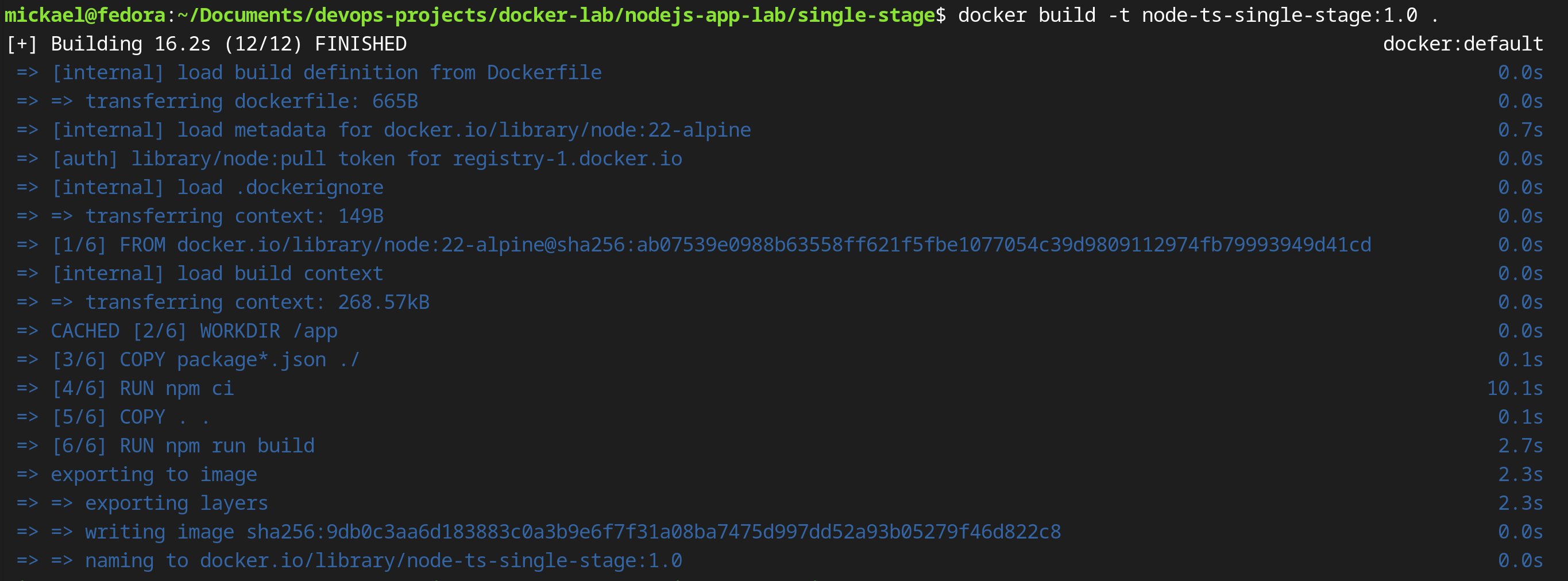
This works. But look at what lands in the image. npm ci installs all 128MB of dependencies. COPY . . brings in the .ts source. npm run build compiles it, but the compiler stays. Source, compiler, bundler, test runner – all shipped. None of them run in production.
Final image: 289MB.
Multi-stage: leave the build behind
 1# ---- build stage (throwaway) ----
 2FROM node:22-alpine AS build
 3WORKDIR /app
 4COPY package*.json ./
 5RUN npm ci                 # ALL deps, incl. the compiler
 6COPY . .
 7RUN npm run build          # tsc -> dist
 8
 9# ---- runtime stage (what ships) ----
10FROM node:22-alpine AS runtime
11WORKDIR /app
12ENV NODE_ENV=production
13COPY package*.json ./
14RUN npm ci --omit=dev      # production deps only – no compiler
15COPY --from=build /app/dist ./dist   # copy only the compiled output
16USER node
17EXPOSE 3000
18CMD ["node", "dist/server.js"]
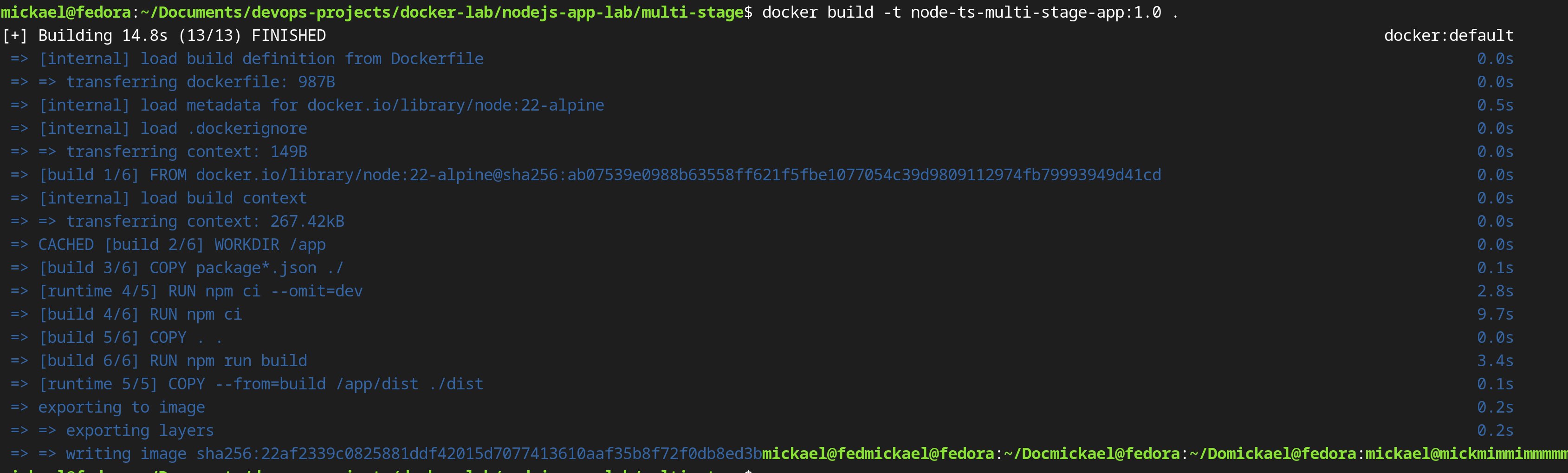
Two FROM lines means two separate images. When the build finishes, the build stage is discarded. Everything in it – compiler, dev deps, .ts source – is gone. The final image is the runtime stage only.
Now for the four reasons this matters.
1. Reduced image size
The key instruction is in the runtime stage:
1RUN npm ci --omit=dev
--omit=dev tells npm to skip everything in devDependencies. In this project that means typescript, webpack, jest, eslint, prettier, and all their @types packages. None of them are installed in the final image.
The other instruction that keeps the image lean:
1COPY --from=build /app/dist ./dist
This copies only the compiled output from the build stage. Not the .ts source files. Not node_modules from the build stage. Just the .js that the runtime actually needs.
| Image | Size |
|---|---|
| single-stage | 289MB |
| multi-stage | 167MB |

122MB gone – about 42% – purely from leaving build tooling behind. The base image (node:22-alpine, ~163MB) is identical in both, so nearly all of the savings is exactly the dev tooling and source the runtime stage never installs.
2. Improved security
The runtime stage never installs dev dependencies. That is not just a size win.
When I ran npm install, npm flagged 19 moderate vulnerabilities – almost all in dev tooling (webpack and jest dependency chains). Because the runtime stage uses RUN npm ci --omit=dev, those packages are never installed in what ships. Those CVEs are not present in the final image. You cannot be exploited through a compiler that is not there.
The same applies to source code. In a single-stage build, COPY . . puts your .ts source into the image. In the multi-stage build, source never touches the runtime stage:
1# build stage: source lands here, gets compiled, then this stage is discarded
2COPY . .
3RUN npm run build
4
5# runtime stage: source is never copied here
6# only the compiled output crosses the boundary
7COPY --from=build /app/dist ./dist
No source code in the final image means no accidental exposure of business logic, credentials left in source comments, or internal module paths. Not present beats present but unused.
3. Enhanced maintainability
Named stages make each stage's purpose explicit in the Dockerfile itself:
1FROM node:22-alpine AS build    # intent: compile the app, will be discarded
2...
3FROM node:22-alpine AS runtime  # intent: this is what ships to production
Without named stages, a single-stage Dockerfile relies entirely on comments to explain why certain commands appear in a certain order. With named stages, the structure makes the intent clear.
Named stages also let you target a specific stage at build time:
1docker build --target build -t myapp:build .
This builds only up to the build stage – useful when debugging a compilation error or inspecting what the compiler produced, without running the full multi-stage build. You cannot do this with a single-stage Dockerfile.
As Dockerfiles grow – test stages, separate stages for different build targets – named stages keep the file readable by grouping related instructions under a clear label rather than scattering them through a single linear script.
4. Faster builds
Two things make multi-stage builds faster: layer caching and stage parallelisation.
Layer caching
Docker caches each instruction as a layer and reuses it on subsequent builds if nothing above it changed. The order of instructions matters enormously.
In the build stage:
1COPY package*.json ./   # cached until package.json changes
2RUN npm ci              # cached until package.json changes – 128MB install skipped on most builds
3
4COPY . .                # invalidated on every source change
5RUN npm run build       # reruns only when source changes
package.json changes rarely. COPY package*.json ./ and RUN npm ci are served from cache on almost every build. Only COPY . . and RUN npm run build rerun when you edit source code. If you reversed the order – copying all source before running npm ci – a single file change would force a full npm ci on every build.
The same pattern applies in the runtime stage:
1COPY package*.json ./
2RUN npm ci --omit=dev   # cached as long as package.json is unchanged
3COPY --from=build /app/dist ./dist
Stage parallelisation
BuildKit (Docker's build engine) can run independent stages in parallel. If you add a test stage that branches off the same deps as build, BuildKit runs them simultaneously:
 1FROM node:22-alpine AS deps
 2WORKDIR /app
 3COPY package*.json ./
 4RUN npm ci
 5
 6FROM deps AS test           # runs in parallel with 'build'
 7COPY . .
 8RUN npm test
 9
10FROM deps AS build          # runs in parallel with 'test'
11COPY . .
12RUN npm run build
13
14FROM node:22-alpine AS runtime
15WORKDIR /app
16ENV NODE_ENV=production
17COPY package*.json ./
18RUN npm ci --omit=dev
19COPY --from=build /app/dist ./dist
20USER node
21EXPOSE 3000
22CMD ["node", "dist/server.js"]
test and build both depend on deps, but not on each other. BuildKit detects that and runs them at the same time. On a CI machine with multiple cores this meaningfully cuts total build time compared to running each stage sequentially.
For the two-stage example in this post the gain is modest (16.2s → 14.8s). With a heavier toolchain or a parallel test stage, the difference is far larger.
When to use it
Use multi-stage when your app has a build step whose tools you do not want in production:
- TypeScript (
tsc) - React / Vite / webpack bundles
- Go (compile to a binary)
- Java (build the jar)
The rule: if you need something to build but not to run, it belongs in a build stage you throw away.
When not to bother: a plain JavaScript app with no build step. Node runs the .js directly. There is nothing to compile, nothing to leave behind. Multi-stage just adds complexity for no gain. Single-stage with an alpine base is the right call there.
Takeaway
Multi-stage builds give you four things, and size is just the entry point:
- Smaller images –
RUN npm ci --omit=devandCOPY --from=buildkeep only what the app needs to run. - Fewer CVEs – dev tooling and source code never land in the runtime stage, so their vulnerabilities are not in what you ship.
- Readable Dockerfiles –
AS buildandAS runtimemake intent explicit and unlock--targetfor debugging individual stages. - Faster builds – instruction ordering maximises cache hits; BuildKit parallelises independent stages.
For this app: 289MB down to 167MB, 19 CVEs gone, build time cut. On a heavier toolchain all four numbers are bigger. The pattern is always the same – a throwaway build stage, a clean runtime stage, and COPY --from=build to carry only the output across the boundary.
If an article saved you time or helped you solve a problem, buying me a coffee is a great way to show your support — and keeps me motivated to write more.

Found this useful? Follow the blog to stay informed on new posts — it's free. Have questions or want to discuss further? Leave a comment below.
