Shared Storage Across Availability Zones with Amazon EFS
Most engineers reach for EBS without thinking twice. It works, it's fast, and it's familiar. But EBS is attached to one instance in one AZ. The moment you need more than one instance to read and write the same data, EBS falls short.
That's where EFS comes in, and understanding when to use it is the difference between a working architecture and one that creates problems later.
The Problem
EBS is block storage. One volume, one instance, one AZ. If you're running a single EC2 instance, it's fine. But if you're running a distributed application across multiple instances or multiple AZs, and those instances need access to a shared filesystem, EBS won't cut it.
Common scenarios where this matters:
- A web application with shared uploads or static assets
- A distributed application where multiple nodes need to read config or write logs to a common location
- Any workload requiring shared persistent storage across an Auto Scaling Group
You could work around it with S3, but S3 is object storage and it doesn't behave like a filesystem. For workloads that expect POSIX filesystem semantics, EFS is the right tool.
What EFS Actually Is
EFS is a managed NFS filesystem. You mount it on EC2 instances just like any other filesystem. Multiple instances can mount it simultaneously, read and write concurrently, and see each other's changes in real time.
What makes it resilient is the architecture. EFS is regional. AWS manages mount targets in each AZ automatically. Your instances mount via their local AZ mount target, which means traffic stays within the AZ and doesn't cross AZ boundaries unnecessarily.
What We Built
Three EC2 instances (web-01, web-02, web-03) across three availability zones (eu-west-2a, eu-west-2b, eu-west-2c), all mounting a single EFS filesystem (lab-efs).
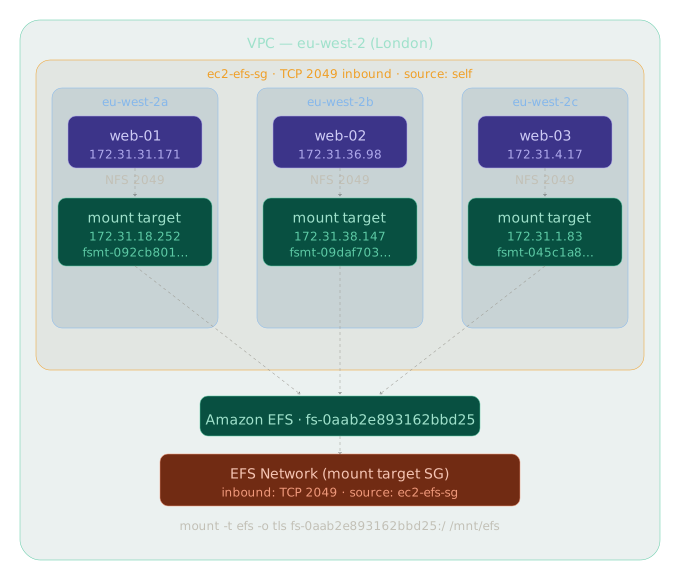
The goal was simple: write from one instance, read from another. Prove shared concurrent access across AZs.
Security Group Design
This is where most people get it wrong on first setup.
EFS mount targets sit behind a security group. If your EC2 instances can't reach port 2049 (NFS) on the mount targets, the mount times out with no useful error message. I spent time on this.
The cleanest pattern for a lab is a self-referencing security group rule:
- Create one SG (
ec2-efs-sg) - Attach it to your EC2 instances and to the EFS mount targets
- Add an inbound rule: TCP 2049, source = the SG itself
Any resource in the group can reach port 2049 on any other resource in the group. Simple, no CIDR blocks, no hardcoded IPs.
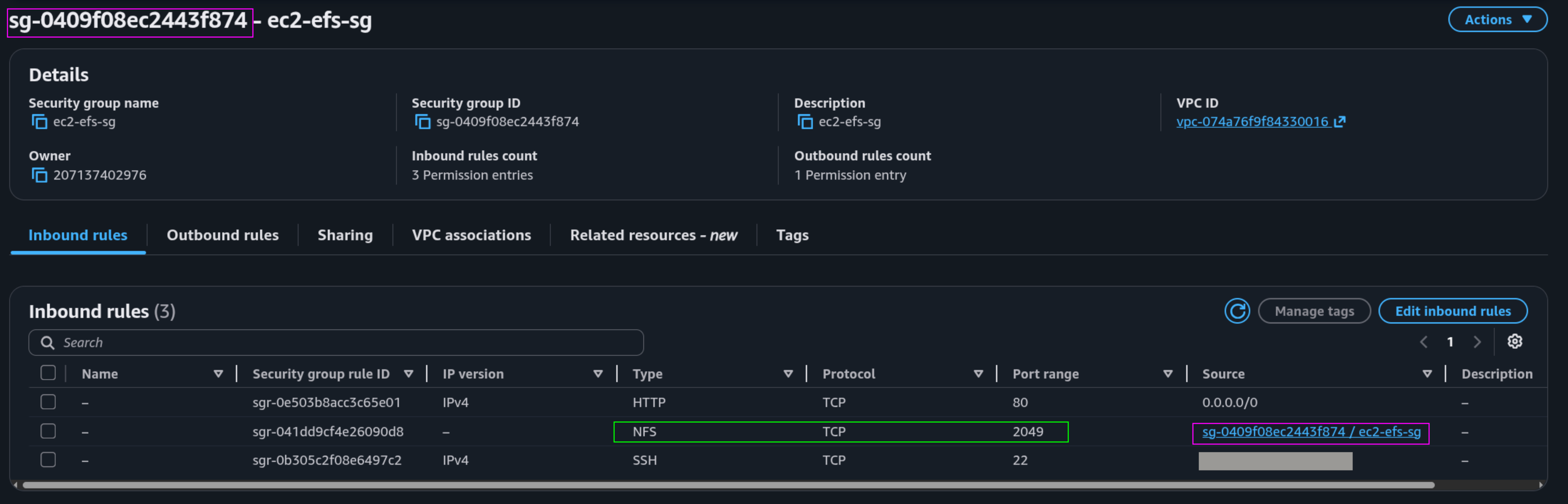
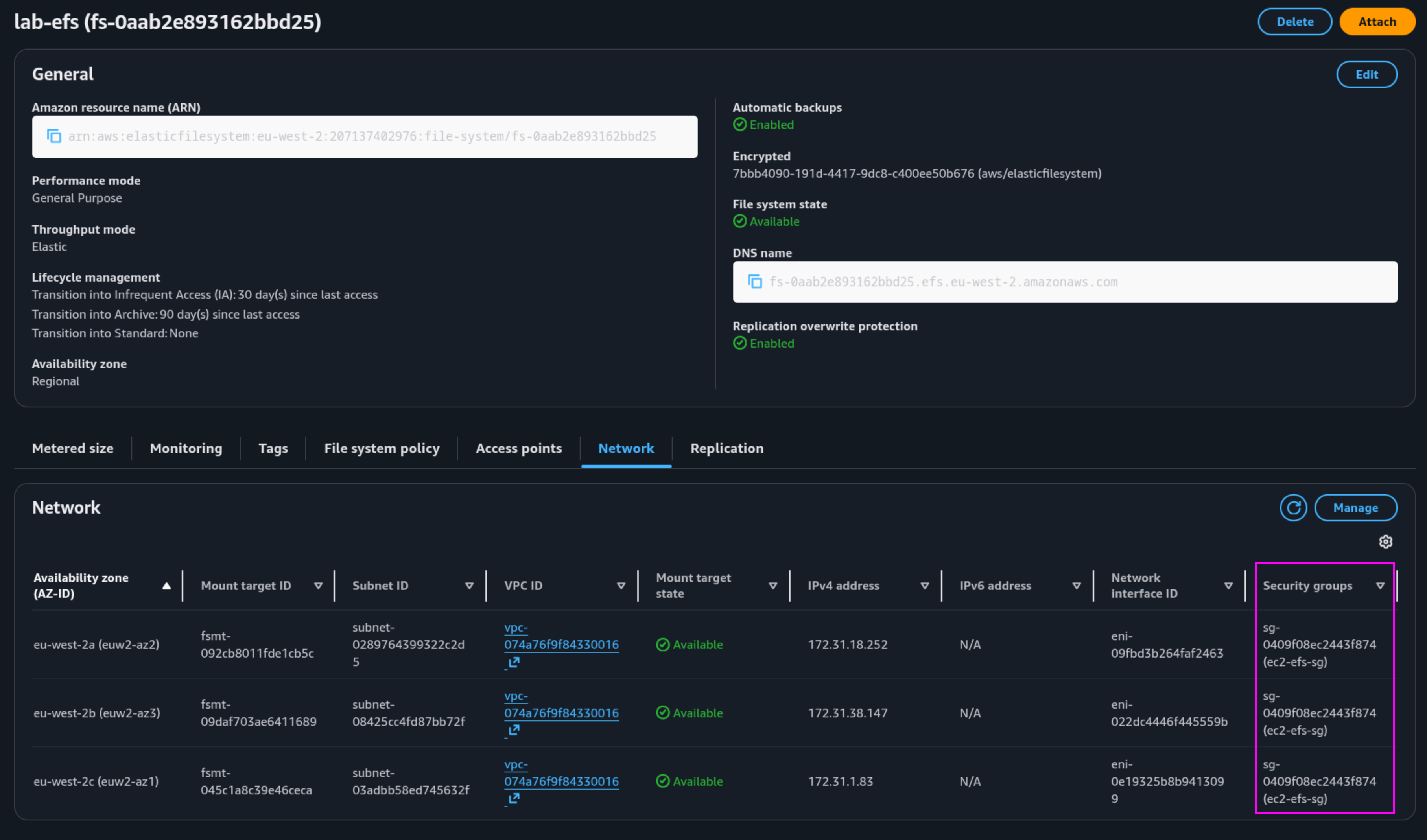
In production, I'd go further: a dedicated sg-efs on the mount targets with a single inbound rule sourced from the EC2 SG only. Principle of least privilege. The EFS SG has no reason to allow SSH or HTTP traffic.
Mounting with TLS
Use the EFS mount helper with TLS enabled. The commands below are for Amazon Linux 2023, which was used for this lab. If you are on a different distribution, the package manager and package name may differ.
1sudo yum install -y amazon-efs-utils
2sudo mkdir /mnt/efs
3sudo mount -t efs -o tls fs-xxxxxxxx:/ /mnt/efs
The -o tls flag encrypts data in transit. It's one flag. There's no good reason to skip it.
Proving It Works
Once mounted on all three instances, the test is straightforward:
On web-01:
1echo "written from web-01 in eu-west-2a" | sudo tee /mnt/efs/test.txt
On web-02:
1echo "written from web-02 in eu-west-2b" | sudo tee -a /mnt/efs/test.txt
On web-03:
1cat /mnt/efs/test.txt
Output:
1written from web-01 in eu-west-2a
2written from web-02 in eu-west-2b
One file, three instances, three AZs, real-time visibility. That's shared persistent storage working as expected.
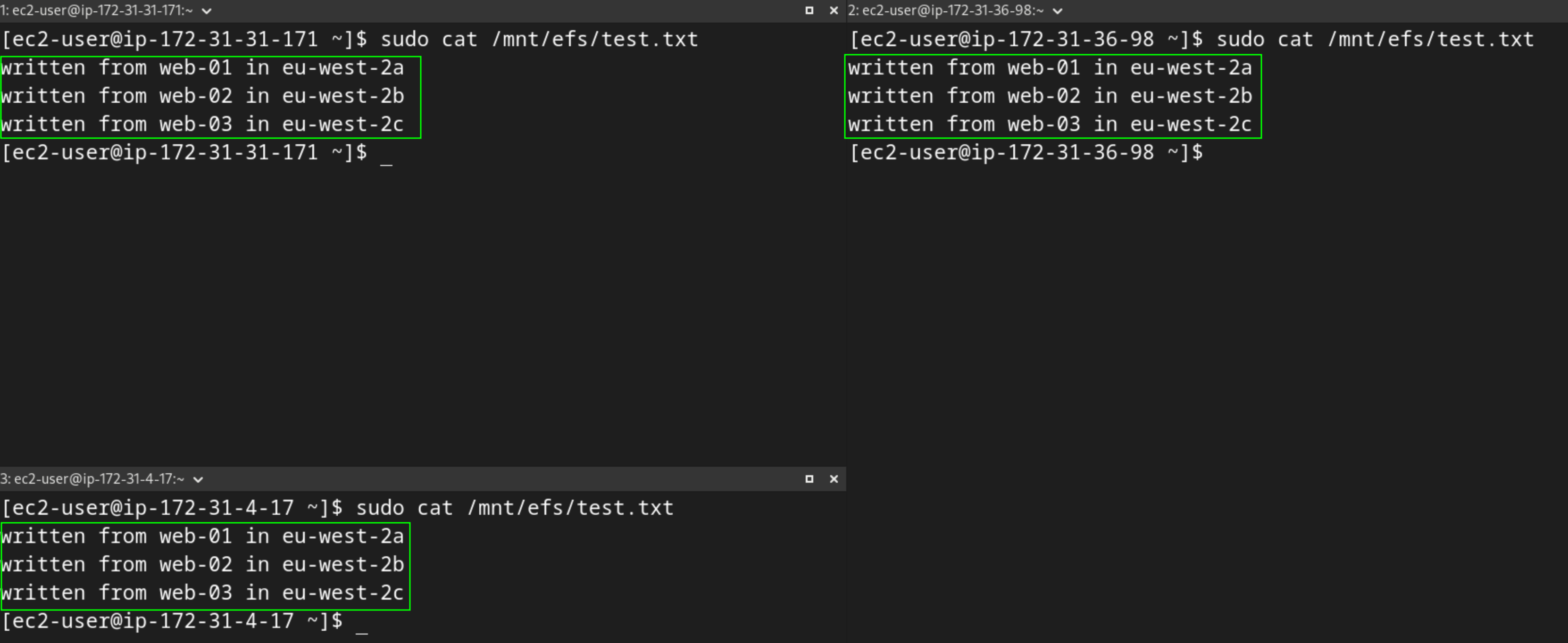
One thing worth noting: tee without -a overwrites the file. Always use -a when appending. It's an easy mistake that makes the output look wrong when the filesystem is actually working fine.
One Caveat: Mounts Don't Survive Reboots
The manual mount works, but it doesn't persist. Reboot web-01 and the EFS mount is gone. Running cat /mnt/efs/test.txt returns No such file or directory because /mnt/efs is now an empty local directory.

To make the mount persistent, add an entry to /etc/fstab on each instance:
1echo "fs-xxxxxxxx:/ /mnt/efs efs _netdev,tls 0 0" | sudo tee -a /etc/fstab
The _netdev flag is important. It tells the OS to wait for the network to be available before attempting the mount. Without it, the instance can fail to boot cleanly if EFS isn't reachable during startup.
Dry-run the fstab entry to verify it is correct, without actually mounting:
1sudo mount -fav
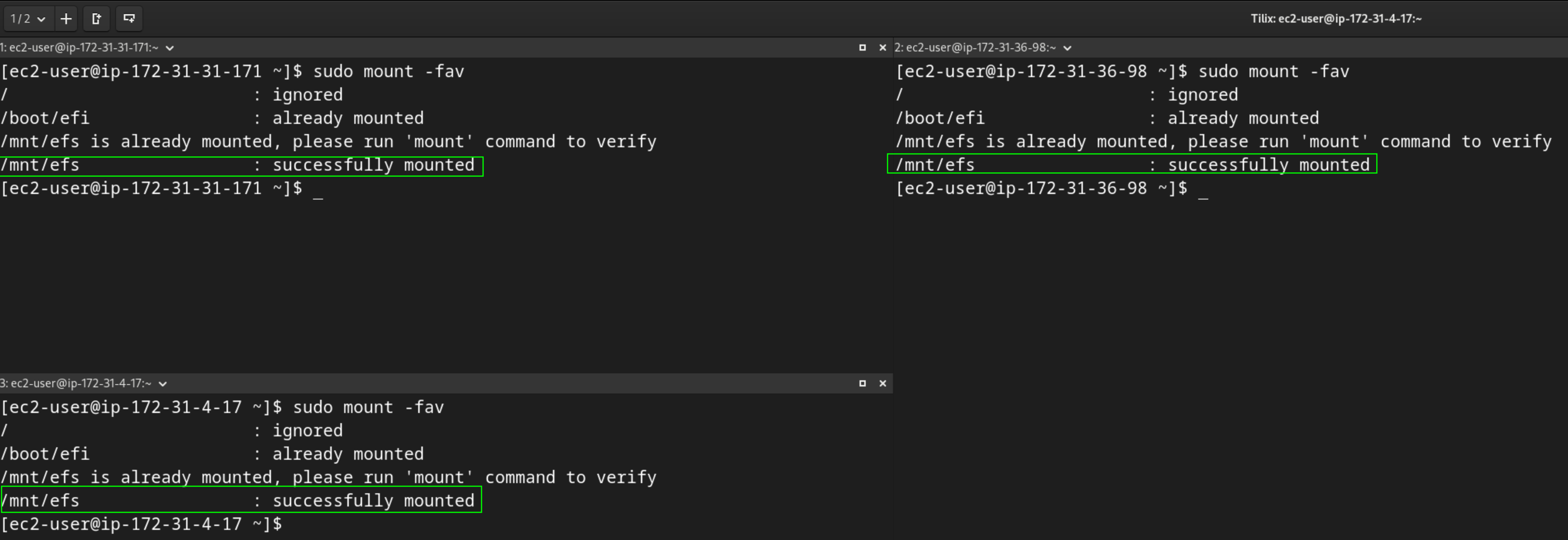
Then reboot and verify the mount is back:
1sudo reboot
2# after reconnecting
3df -h | grep efs
4cat /mnt/efs/test.txt
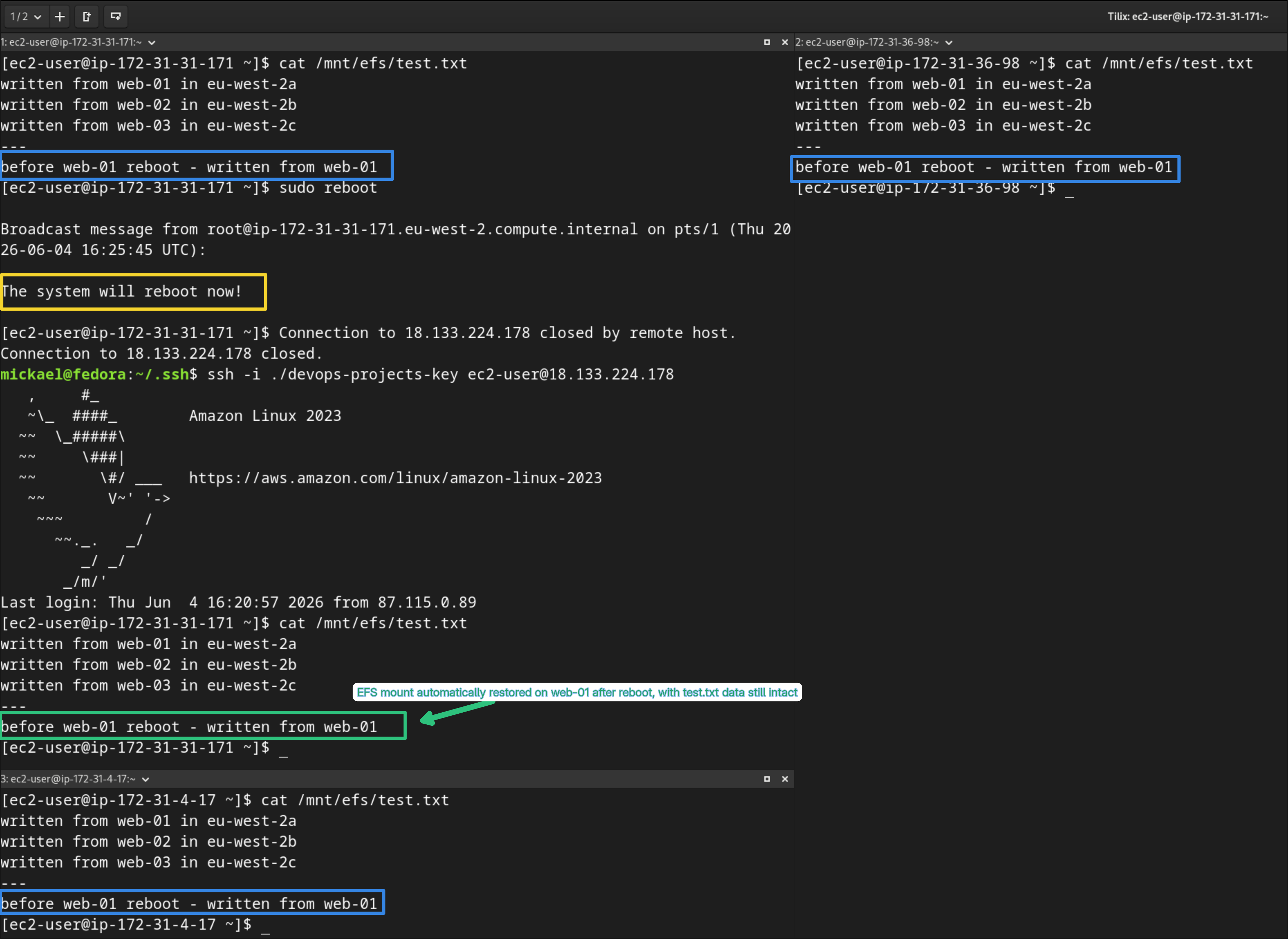
After rebooting web-01, the EFS filesystem mounts automatically and test.txt is immediately readable. The same data written earlier from web-01 and web-02 is still there. The /etc/fstab entry ensures the mount is restored on every boot without any manual intervention, and because the underlying data lives on EFS rather than the instance, nothing is lost when the instance restarts.
When to Use EFS vs EBS vs S3
This comes up a lot so it's worth being direct about it:
- EBS: single instance, high IOPS, databases, OS volumes. Fast, simple, not shareable.
- EFS: shared filesystem across multiple instances or AZs. POSIX semantics, concurrent access, higher latency than EBS.
- S3: object storage, not a filesystem. Great for backups, static assets, data lakes. Doesn't behave like a mounted drive.
If your application writes to a path like /var/uploads and you need multiple instances to see those files, EFS is the answer. Don't force S3 into a filesystem role. It creates complexity at the application layer that EFS handles natively.
What's Next
EFS Access Points for per-application directory isolation, and performance mode selection (General Purpose vs Max I/O) for higher-throughput workloads.
EFS is one of those services that engineers underuse because they default to EBS. Once you've seen it work across AZs in real time, the use cases become obvious.
If an article saved you time or helped you solve a problem, buying me a coffee is a great way to show your support — and keeps me motivated to write more.

Found this useful? Follow the blog to stay informed on new posts — it's free. Have questions or want to discuss further? Leave a comment below.
